



Zoom helps teams turn conversations into action with a unified context layer and enhanced My Notes and ZoomMate capabilities
Zoom’s Unified Context Layer helps teams spend less time tracking down what happened in meetings and more time acting on it
Every business runs on conversations. Decisions are made in meetings, details are confirmed over chat, and next steps are agreed to on calls. But the path from conversation to completed work is often broken.
Teams spend hours copying notes, reassembling context, and manually tracking what was decided before any work can move forward. This often means toggling between several fragmented tools, adding complexity to daily work.
Today at Zoomtopia, the company’s annual customer conference, Zoom rolled out a Unified Context Layer designed to marry two fundamentally different types of data: dynamic conversation intelligence from meetings, phone, chat, and contact center interactions — which holds rich, real-time context — and static data from documented company knowledge and connected third-party systems of record, which can become outdated but remains critical. Together, these give Zoom a complete picture of what’s happening across the workday — decisions being made, context being created, and actions being taken — in real time, so the right information flows directly into the workflows where action happens with full context.
“Many companies have solved how to capture conversations. The harder problem, and the one that actually determines whether AI delivers value, is what happens next,” said Russell Dicker, chief product officer at Zoom. “Conversation feels natural. Getting work done should feel just as natural. That’s the idea behind Zoom’s Unified Context Layer, designed to close the gap between conversation and action without requiring extra human effort. That’s the foundation of our AI strategy, and where we’re focused.”
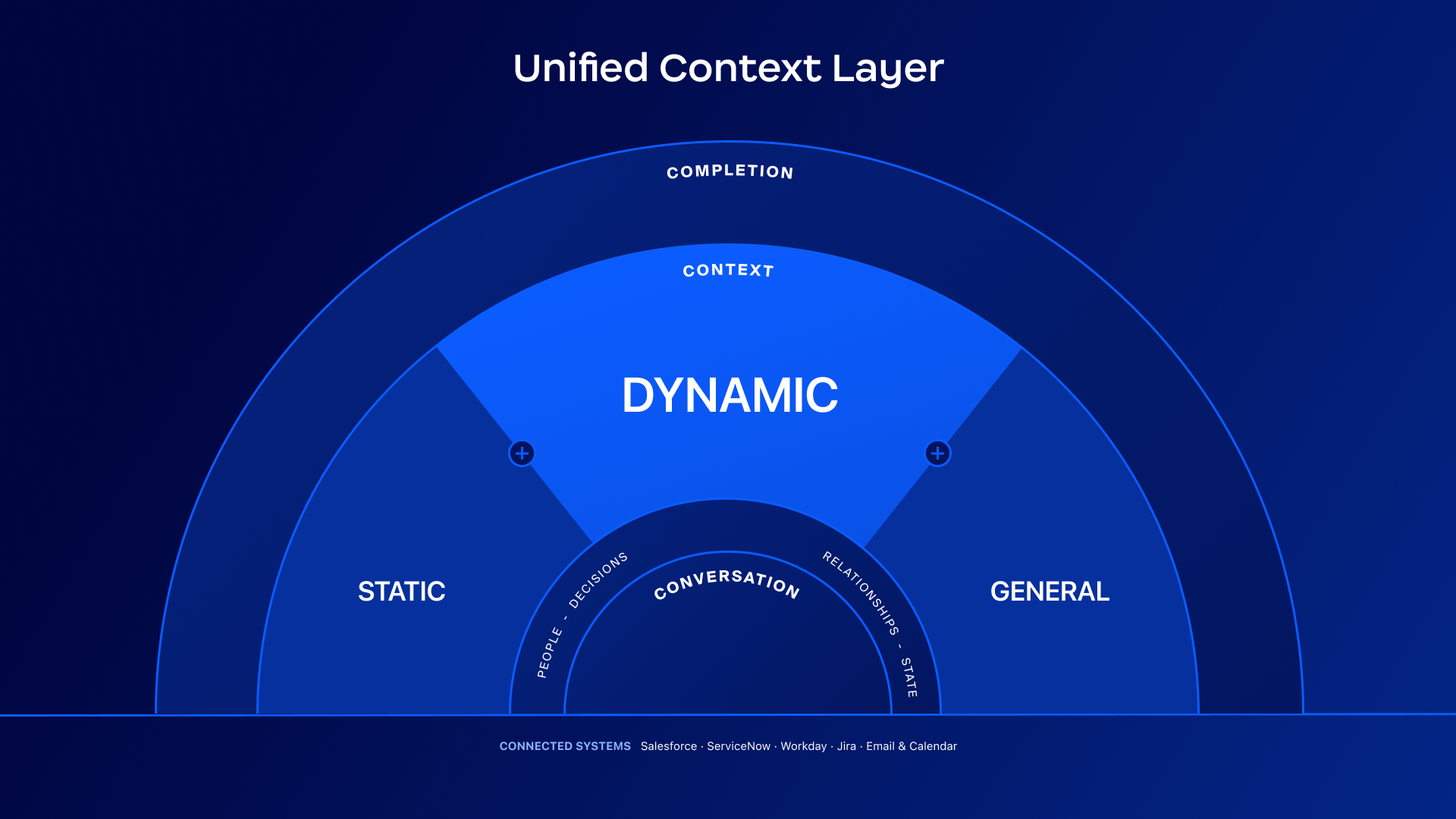
Zoom’s Unified Context Layer helps turn conversations into completed work
Every day, teams generate thousands of data points across meetings, calls, chats, and messages. Each conversation individually holds a piece of the puzzle.
Rather than leaving teams to manually reassemble context across disconnected tools, Zoom organizes what was discussed, decided, and assigned into a unified context, so that information is ready wherever work happens next. When a team member asks a question or starts a task, Zoom can use this valuable context to help teams move forward from conversation to completion.
Because the unified context layer spans across Zoom’s platform, including documented company knowledge and connected third-party apps, as well as customer experience, it serves as a powerful foundation.
And with Zoom’s new headless approach, that context doesn’t stay locked inside the Zoom client. Conversation intelligence can be accessed via MCP connectors and APIs, allowing Zoom context to be used in other AI platforms, like Claude, ChatGPT, and Codex, so that decisions and details are surfaceable wherever work is actually happening. Starting in November, users will also be able to launch Zoom workflows directly from Claude and Codex, automating meeting, chat, and phone tasks and even updating CRM records.
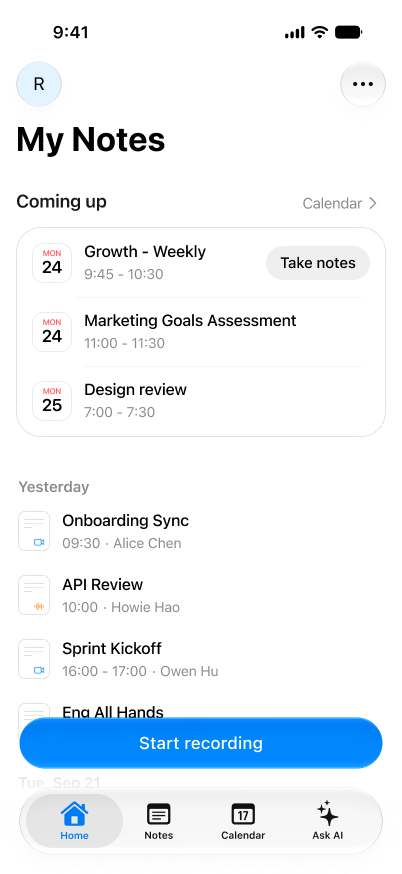
Users will soon be able to access My Notes via a standalone mobile app.
Persistent context layer for conversations
Critical conversation context often gets lost the moment a call ends, buried in disconnected notes or forgotten entirely. With Zoom’s new Unified Context Layer, My Notes evolves to capturing and surfacing context where teams need it most.
- Capture conversations that happen off-camera. The new My Notes standalone mobile app can record and transcribe in-person meetings without requiring users to have the Zoom Workplace app, bringing the same meeting capture and summarization capabilities to hallway conversations, offsite meetings, and impromptu check-ins. (Expected December 2026.)
- Stay in the loop without being in the room. Follow Meeting allows users to send My Notes to attend Zoom meetings on their behalf, even when they are unavailable. Invited team members can receive a personalized transcript and AI-generated summary through My Notes—whether they join late, leave early, or miss the meeting entirely. An auto-start option is also available for invited Zoom meetings. (Expected December 2026.)
- Keep the visual details that are not said out loud. Screen Capture in Transcript captures screenshots mid-meeting and ties them to the exact moment in the transcript, so the slide or chart being discussed is preserved alongside the conversation and can be found later. (Expected December 2026.)
- Extend meeting intelligence beyond the screen. New and expanded hardware partnerships with Bota and DTEN, respectively, will help to bring My Notes to in-person conversations. Bota has two devices: Leaf, a magnetic card for phone-based capture, and Bean, a wearable for hands-free recording. The DTEN Action Card is a credit-card-sized device that can turn any in-person conversation into My Notes with one press, no phone or laptop needed. Both can connect directly to My Notes. (Bota expected Q1 2027; DTEN expected November 2026.)
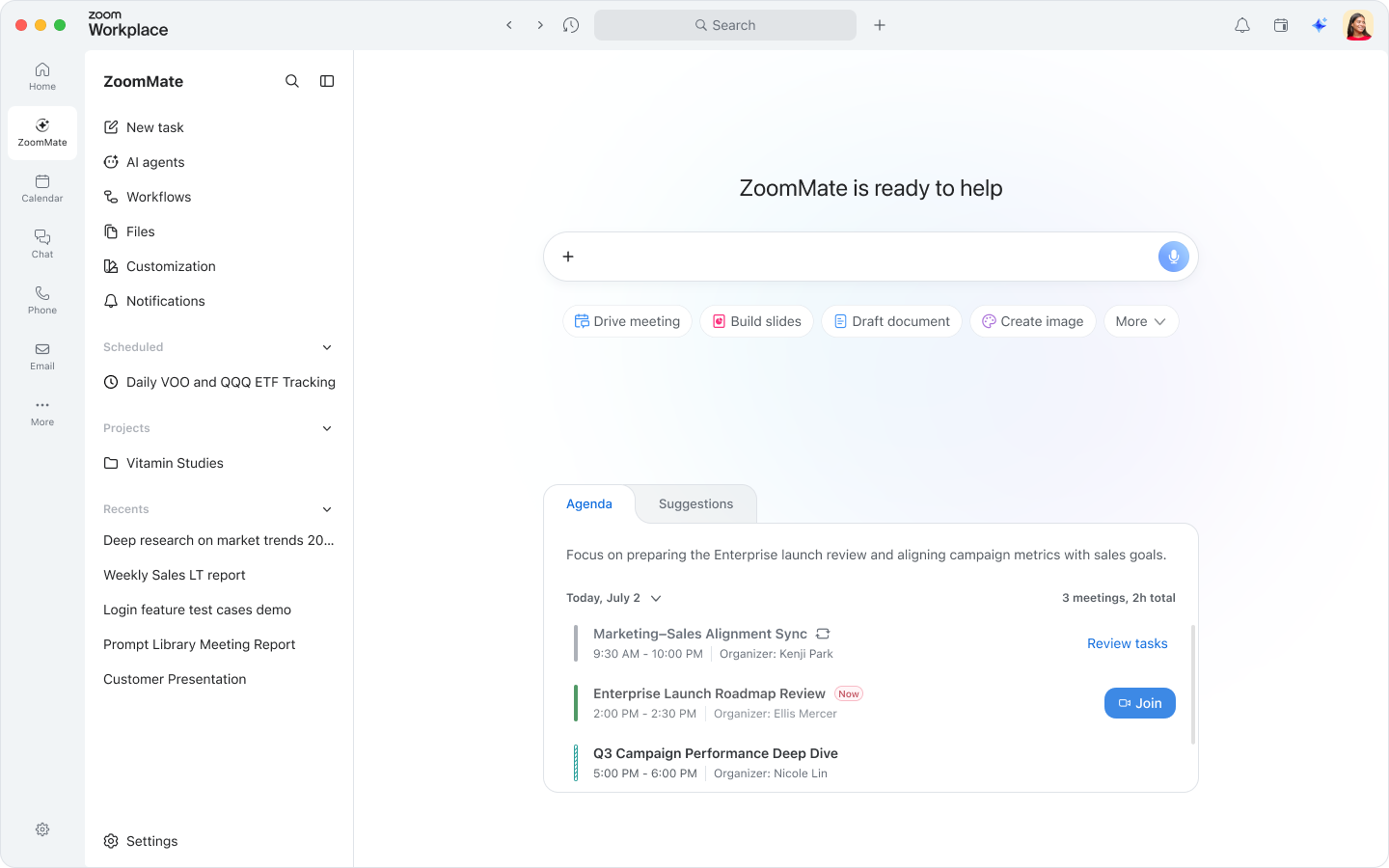
Turn conversation context into action
Work doesn’t end when a conversation does — it just moves into a dozen different apps, threads, and to-do lists, and keeping it all connected shouldn’t rely entirely on manual follow-up. Today, Zoom is introducing a new set of task completion capabilities to help close that gap, turning conversations into answers, meetings into workflows, and projects into completed deliverables.
- Find answers without needing to retrace every conversation. Tracking down a decision or a detail often means manually searching through multiple apps and message threads. Agentic search helps surface answers from across Zoom Meetings, Phone, and Chat, as well as more than 40 third-party applications, including ServiceNow, Workday, Google Drive, and Microsoft OneDrive, so teams can get the answers they need swiftly, regardless of where the conversation happened. (Available now.)
- Automatically turn meetings into workflows. My Notes Workflows can send meeting summaries to different solutions, from Zoom Chat to Salesforce, with prebuilt templates intended for sales, marketing, and IT use cases. A natural language interface lets teams “describe it” to build custom automations directly in My Notes, without needing to touch a workflow builder. (Expected October 2026.)
- Accelerate project task completion. ZoomMate’s AI Agent Teams are designed to work in parallel on different parts of a project simultaneously. The team lead AI agent coordinates tasks among specialized AI agents and consolidates outputs into a single deliverable for human review, enabling faster coordination and execution. (Available now.)
- With My Notes at the center, Zoom for Business Owners helps client-focused businesses turn meeting notes into action. Sync meeting context with Bonsai, quickly draft proposals, help manage client work, and streamline billing, all with less manual follow-up. (Available now.)
Where conversations become actions
Zoom Workplace and Zoom Business Services are built on an open ecosystem that gives organizations flexibility and choice across models and vendors.
Through MCP connectors and APIs, users can access Zoom context directly within third-party AI platforms, bringing Zoom’s conversation intelligence into the tools where work is already happening. And because Zoom’s federated AI approach automatically selects the best-fit model for each use case, including models from multiple leading AI providers, it reflects the same commitment to openness and flexibility that runs across the platform.
That openness is designed to extend across how teams work, with Zoom’s Unified Context Layer as the foundation.
Learn more about Zoom’s Unified Context Layer and expanded ZoomMate capabilities at Zoomtopia or visit the Zoom blog.
Related News


Zoom Media Kit
Explore our Media Kit for essential information and resources to help you out.
Learn more