Zoom debuts a simplified, more intuitive AI-first experience
Today, Zoom is refreshing the look of the Zoom Workplace app to make daily work easier, faster, and more productive. This update brings a clean, simplified user experience to core products like Zoom Meetings, Zoom Team Chat, and Zoom Whiteboard, along with the new AI Companion 3.0 experience on the web and in Zoom Docs.
“The goal of these updates is simple: to make your workday flow effortlessly,” said Angela Guzman, head of design at Zoom. “We’re not just changing the look, we’re enhancing the functionality and admin controls so you can focus on getting your best work done, whether you’re collaborating in a meeting or chatting with your team.”

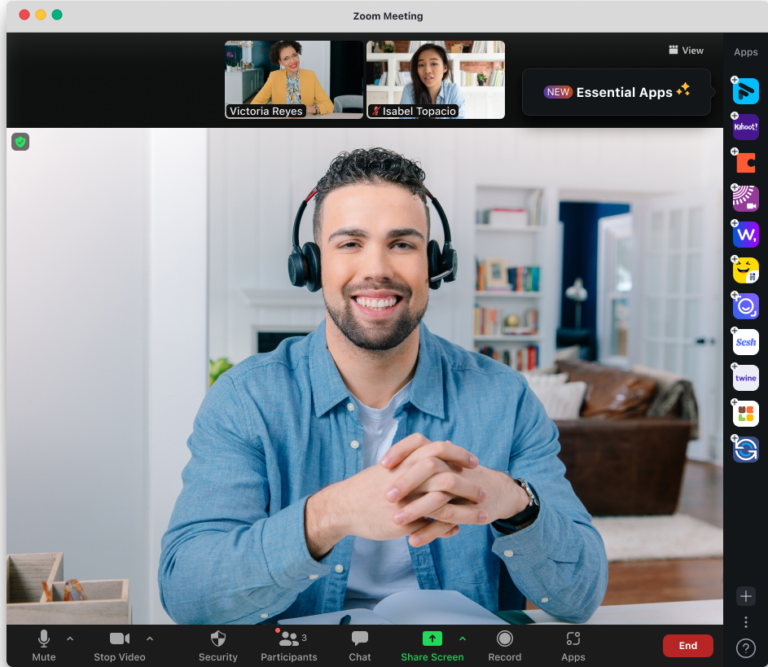
Zoom Workplace with the new refreshed look.
Easy-to-use solutions power productivity
Zoom’s updated design delivers a more simplified user experience, to help make users’ workdays more efficient.
- Zoom Workplace app: A refreshed, simplified look makes it easier to navigate, switch between tabs, and maintain control of the layout.
- Zoom Meetings: An enhanced, streamlined in-meeting experience with a simplified toolbar, consolidated user settings, and organized host tools, helps users access and personalize experiences across mobile and desktop.
- Zoom Team Chat: A refreshed, cleaner design that’s consistent across desktop, mobile, and web, making it easier than ever to stay connected and organized.
- Zoom Whiteboard: Now available in a new streamlined web experience for easier access from an internet browser, no download required. Designed for users who prefer browser-based tools or want to purchase and access Zoom Whiteboard without the full Zoom Workplace suite.
- Zoom Hub: A single, easy-to-navigate place for accessing and managing content across Zoom Workplace will now be enabled by default for online users (expected to expand to all other users in February 2026) serving as a new home base for work. AI Companion capabilities allow users to quickly gather insights, pull information from Zoom files and third parties assets, and generate new content.
- Zoom Events: Webinars Plus and Events customers now get a cleaner navigation menu and a streamlined setup flow. Start with the essentials, layer in features like lobbies or ticketing as needed, and get to your live event faster.
Check out the Zoom blog for more on how Zoom is making the workday simpler.
Smarter AI-first collaboration
New AI features help teams move projects forward faster and stay connected with colleagues and customers.
- Zoom Rooms Voice Commands: Enhanced commands allow users to say, “Hey Zoomie” to check in, start meetings, or adjust room settings. Control camera, audio, and ad hoc meetings hands‑free, and ask for help with actions like adding participants or sharing a screen for a smoother, more intuitive in‑room experience (expected to be available at the end of December 2025).
- Zoom Phone to Tasks: Automatically create tasks from calls and voicemails. AI Companion analyzes call summaries and voicemails to recommend follow-up actions and creates tasks, ensuring follow-up actions are never missed.
- Zoom Docs: In addition to the capabilities that launched with AI Companion 3.0, users can now more easily stay aligned, save time, and unlock insights with Zoom Docs. Easily pull multiple meeting summaries into one organized data table to track progress and decisions, as well as use AI to identify risks, extract insights, and categorize feedback automatically. And finally, AI helps users digest complex documents quickly through summaries, overviews, and visual mind maps.
Seamless connections and workflows
- AI Concierge Dial by Name: Connect with the right person or department faster by saying the individual’s or team’s name for quickly routed calls, keeping a user’s front desk focused on higher-value work.
- SMS Delegation: Individuals can send and receive text messages on behalf of another person using the delegator’s Zoom Phone number. Designed for executives, assistants, and shared coverage teams, SMS Delegation helps organizations maintain seamless and consistent communication workflows (available with PowerPack).
- Scheduler Delegation: Let trusted assistants and teammates manage bookings and events while maintaining full calendar ownership. Delegates can securely handle scheduling, rescheduling, and client communications, without the need to share user account credentials.
In today’s fast-paced work environment, the quality of collaboration solutions has a direct impact on productivity and employee well-being. With these updates, Zoom continues to simplify the complex, allowing users to spend less time navigating software and more time focused on meaningful collaboration. To learn more about Zoom Workplace, visit the Zoom website.
Related News




Zoom Media Kit
Explore our Media Kit for essential information and resources to help you out.
Learn more